
projio
Project knowledge orchestrator and MCP server for research repositories.
Projio turns a research repository into a queryable knowledge environment for humans and AI agents. It layers structured, machine-accessible knowledge over a repo — code, papers, notes, pipelines, figures, questions — and exposes it through a unified MCP server so humans and AI agents work from the same view.
Install
pip install projio                # core orchestrator + MCP server
pip install "projio[all]"         # all ecosystem packages
What projio owns vs. what it coordinates
Projio itself is small: workspace scaffolding, docs-site workflows, the MCP entrypoint, and the questio research-question layer. Everything else lives in focused sibling packages that projio composes. This separation keeps each domain independently usable and specced.
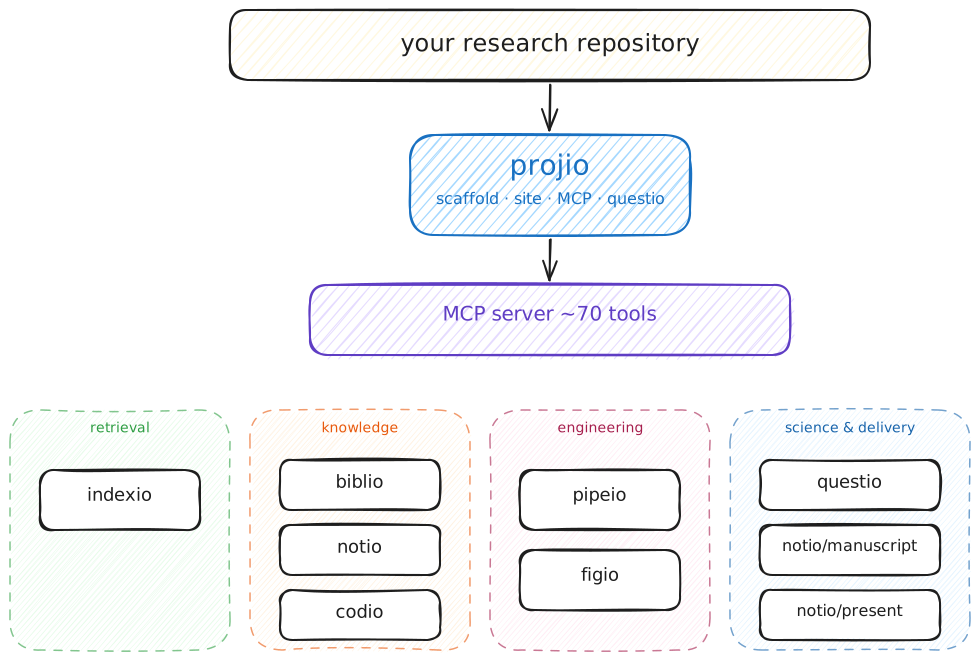
The engineering vs. science split is deliberate — see the delegation model for how pipeio flows, result notes, questio questions, and deliverables each own distinct content and link in one direction.
Ecosystem
Retrieval substrate
| Package | Goal | Spec |
|---|---|---|
| indexio | Domain-agnostic corpus indexing, chunking, embedding, and semantic search — the shared retrieval infrastructure every other package registers sources with | site |
Knowledge layer
| Package | Goal | Spec |
|---|---|---|
| biblio | Project-centric bibliography: Zotero sync, OpenAlex/Crossref enrichment, PDF fetch, GROBID/Docling parsing, compiled BibTeX | bib architecture |
| notio | Structured project notes, idea capture, worklog — hosts the manuscript and present subpackages for paper and deck production |
site |
| codio | Code-library registry with three tiers (core / shared / external), reuse discovery, implementation-strategy intelligence | code tiers |
Engineering layer
| Package | Goal | Spec |
|---|---|---|
| pipeio | Agent-facing pipeline authoring — flows, contracts, notebook lifecycle, Snakemake integration. Owns engineering, not science | pipeio spec |
| figio | Declarative figure orchestration: FigureSpec YAML → panel rendering → SVG composition → PDF/PNG | site |
Science & delivery
| Subsystem | Goal | Spec |
|---|---|---|
| questio (in projio core) | Research questions, hypothesis tracking, prior art, binding of questions to results and deliverables | questio |
| notio/manuscript | Section assembly, citation checking, figure insertion, pandoc → PDF/LaTeX | site |
| notio/present | Slide decks from reusable sections — reveal.js and Marp backends, cross-project section import | presentio |
| deliverables | Narrative artifacts for external audiences: reports, decks, posters — bind questions and results into a story | deliverables |
Which subpackage do I need?
| I want to... | Use |
|---|---|
| Find existing code, notes, or papers by semantic search | indexio |
| Manage a project's bibliography, fetch PDFs, resolve citekeys | biblio |
| Capture an idea or record a project decision | notio (notes) |
| Discover reusable code or register a new library | codio |
| Author a data-processing pipeline or notebook | pipeio |
| Build a figure from a declarative spec | figio |
| Track a research question and bind results to it | questio |
| Assemble a manuscript for submission | notio/manuscript |
| Build a slide deck or reveal.js talk | notio/present |
Key capabilities
- Search before creation — discover existing implementations, consult literature, then decide: reuse, wrap, or implement new
- 70+ MCP tools — unified agent interface across all subsystems, scoped to the current project
- Three workspace kinds —
generic,tool, andstudyscaffolds for different project types - Engineering/science separation — pipeio builds the machinery; questio, result notes, and deliverables carry the findings and narrative
- Documentation site — MkDocs Material with monorepo plugin and semantic-search chatbot integration
Documentation
The docs follow the Diataxis structure, plus a long-form Handbook for the agentic research workflow:
| Section | Purpose | Start here |
|---|---|---|
| Handbook | Narrative textbook for the open-science research stack (BIDS, DataLad, Snakemake, Marimo, Quarto/MkDocs, projio, agentic on top); companion to the September 2026 workshop | Why this stack, Outline |
| Tutorials | End-to-end guided paths | Quickstart |
| How-to guides | Task-focused recipes | Initialize a workspace |
| Explanation | Design choices and concepts | Ecosystem, Delegation model |
| Reference | Command and layout details | CLI, MCP tools |